Monday, August 24, 2015

Week 5: IP1

What is the key function or interaction for your concept?
Pressing given keys to control the forward movement of a frog crossing the road, and timing it to avoid moving objects.

How does it work?
Presses on randomly assigned keys will move the frog one step across the road.

What do you want to know about your prototype?
For users to understand that they can use different key presses to do the same action, i.e. move forward one space at a time. However each nominated key can only be pressed once only, once it's pressed it no longer performs any action.

How do you want IP1 to work?
The player will be placed in front of the computer, a quick tutorial will be shown to explain the rules. On screen the frog will be placed at the bottom with the goal placed at the top. In between will be moving objects which will need to be avoided. On screen, the key values that control the frog's forward movement will be displayed one at a time. The player must press these exact keys (in any order) to cross the road. However they can only press a key one time only, once that key is pressed it can no longer move the frog forward. The player must press the allocated keys to eventually get to the goal, and avoid the moving objects.

Friday, August 21, 2015

Video Prototype: Testing and Evaluation Results

In this weeks B Prac we ran our video prototype testing sessions. This blog post details my evaluation of this testing session.

Outcomes:
  1. What you asked users to do:Watch the video (advised users they can stop, rewatch, replay video as they like), answer a few questions about the video, ask/answer if they had additional questions, complete a survey containing questions about the concept and the testing session.
  2. What the users actually did:7 out of 8 users didn't replay the video, just watched it once through. Some resized the video to watch full screen. All answered my questions. Some had additional questions and feedback to add. All completed the survey correctly.
  3. The measures you used:No qualitative measures were used in the testing session. Only observations and notes taken.
  4. The feedback you sought:Feedback related to user's understanding of the game concept as communicated in the video prototype (gained from observation, Q & A session post-viewing). Feedback about video production quality, the game concept itself and testing session (from the survey).

Reflection:

Overall the video prototype was a great tool for communicating the concept for the game and it's rules without having to actually build anything yet. All users responded positively to the prototype, understanding the core concept of the game, and most understood the game's rules, interactions and mechanics. It was also good to get some feedback on how to improve the game at this early stage in design, which will make it a lot easier to implement when starting to build, rather than later down the track. 

Testing wise, I found my protocol adequate for what I wanted to achieve in the amount of time allocated. Towards the end of the session I wasn't as strict with asking the same scripted questions, I just asked the last 3 users if they had any questions or didn't understand anything. I felt this was good enough to get the same level of feedback in a shorter time. The lower scored responses to survey question 5 may have been due to the last minute testing towards the end of the session, where I didn't put as much effort in explaining the instructions, although all the participants I observed managed the watch the video, answer questions and completely the survey without any trouble.


Effectiveness:

I thought the video prototype was very effective in explaining the game concept. Overall users typically had a good grasp of the game's concept and rules after watching the video. 2 students who were not familiar with the Guess Who game had some trouble understanding those elements used in the game. The responses to questions 3 and 7 identify that more explanation about the guessing element of the game was necessary to help those understand how this translated into the mashup. Also explicitly showing or stating how the clues are to be delivered would make it clearer to viewers how this part of the game works.


Constraints:

Time constraints meant that I wasn't as thorough towards the end of the session in giving all the same instructions and asking the same questions as in the beginning. This may have resulted in collected less verbal feedback, but I think the result of this was pretty minimal, if any.


Implications:

The confusion of the guessing element and also crossing the road element at the same time has made me more aware that there may need to be more support in the game to train players how to play - maybe using a tutorial, or start playing at a really easy level, where the difficulty increases as time goes on. The next testing session will be quite different and more interactive, so I'll be more observant about their behaviour when interacting with the prototype than I was in this session.


RESULTS:

I had a total of 8 users watch my video and complete the survey. Overall the feedback was positive. After watching I asked a few informal questions directly:

1. What was your first impression of the video?
Comments included: "relaxing", "interesting", "good production", "clear", "good impression", "personal language used", "enjoyed the funny moments".

2/3. Did you understand the concept? Did you understand the rules?
6 out of 8 users responded positively, with no problem understanding. The remainder had some problems understanding the rules, especially concerning the Guess Who elements of the game. In these cases 2 of the users had very little background knowledge of this game, so therefore didn't understand how this translated into the game mashup.

4. What parts didn't you understand?
A user didn't quite understand how the clues were to be delivered in the game. Also here I had to explain the rules of Guess Who for the users who had never played this game, and describe how the Guess Who elements worked in Hop to Who.

After asking these questions, I then asked users to fill out an online survey which asked questions about the video production quality, the game concept itself and the testing process. The questions and results are as follows:

1. How interested are you in playing this game? (Scale 1-5, 1:not at all, 5: Let me try it now!)
4, 5, 4, 5, 5, 5, 4, 4 (Average 4.5)

2. How unique do you think the game's physical interactions are? (Scale 1-5, 1:not unique at all, 5: very unique)
5, 4, 5, 4, 5, 3, 5, 5 (Average 4.5)

3. Do you have any suggestions to improve the game?
"Might be difficult playing both games at the same time coz the frog game is all about timing, but I think it's gonna be pretty fun"
"personal quibble with games that involve love stories. is there another reason the frog would meet someone? other people probably wouldn't care about this."
"through the video, I thought one of results of this game is to find the heart of Mr. Frog. So, maybe for someone, they don't need finish the whole one round of game. I think it can set a condition that anytime picking up the heart from the puzzle, gamer can win in advance"

4. How would you rate the video and audio production quality? (Scale 1-5, 1: poor, 5: excellent)
5, 5, 5, 4, 4, 4, 5, 5 (Average 4.6)

5. In the testing stage, were my instructions clear? (Scale 1-5, 1: I didn't understand at all, 5: I understood the instructions clearly)
5, 5, 3, 5, 5, 5, 4, 3 (Average 4.4)

6. Did you have enough time to ask questions or add comments after watching? (Multiple choice)
No I didn't have enough time: 8
I was given some time, but would have liked more: 0
There was plenty of time to ask questions: 0

7. Do you have any other comments?
"Was a good video! Great idea and well explained"
"Might need to consider for those who have no common sense on either games you mashup including me. Tutorial may work well to me anyway."
"great video and interesting concept. was definitely emotionally invested to save the frog from a car tire - very visual but not alarming :)"

View a summary of the responses here: 
https://docs.google.com/forms/d/13DCUIHV2wHqeu_8hDvAC27Seg8d_jv9Kc-tp_w0o2-0/viewanalytics#start=publishanalytics


Monday, August 17, 2015

Week 4: Contact Session Exercises

In today's contact session we were presented with more about different types of prototypes:
  • Low fidelity / High fidelity
  • Exploratory / Experimental / Operational
  • Horizontal / Vertical / Diagonal
  • Global / Local
These all are different ways to clarify the various goals and scope a prototype has.

After the explanations of each of these types of prototypes, the class was tasked with 2 exercises:

Exercise #1 Car Concept 

What are the functional components?
Our group listed, in no particular order:
  • Dashboard controls, speedometer, tachometer, indicator/wiper controls
  • Keys, Seats, Steering Wheel, Pedals, Hand brake, gearstick, mirrors, seat belt
  • Radio, AC controls, window controls, seat adjustment control
  • Displays, controls for the the display, GPS

Replacing a functional component
Our group discussed a few ideas, such as replacing steering with a trackball, or even using brain waves. The concept we chose involved replacing a car's accelerator pedal with a control based on eye-tracking and monitoring driver concentration. When a driver is looking to the road, this enables the car to accelerate. When the driver takes their eyes off the road, for example if they become distracted by their phone or fall asleep, this prompts the car to slow down and even stop.
Uses facial recognition to analyse the driver's level of emotion/concentration, and this could controls the speed. 

Low-fidelity prototyping
Our group decided the purpose of the prototype would be to test the driver's tolerances of concentration and their current behaviours. For example how long would a driver look away from the road to check blind spots, or check for other traffic. A lo-fi prototype could be a video shown on a monitor place in front of the driver, when the driver looks away, the tester would take note of what they were doing and for how long. Another idea was a driving simulation game, where the user was in control of the steering, but the tester was in control of the speed. The tester would watch the user, and whenever their eyes went away from the screen, the tester would slow down the acceleration.
Another idea I had, which is not entirely lo-fi, but it could use a special car with brake/accelerator pedals on the passenger's side (like those used by driving instructors). The driver would only steer, and the tester would only be watching the driver's responses to inform the acceleration/braking. This would have to be done in a controlled environment though. This way it could be easier to test in other scenarios, such as different weather conditions or time of day.


Exercise #2 Smart phone alarm clock app

The last task for this session was to the design a horizontal, vertical and diagonal prototype each for an alarm app which:

  • Can set, edit & delete multiple alarms
  • Can daisy-chain alarms -if one is allowed to ring out, another is activated automatically
  • Can set different tones for different alarms
  • Shake phone to snooze

Horizontal prototype:
A horizontal prototype basically shows the wide range of features, but without any of the functional deep interactions. This prototype could be the home screen of the app, it would show the button for creating a new alarm and would list any existing alarms and their details below, with a link to edit and delete these. Of course there would be no functionality, it would only be used for showing the front end "dashboard" a user would see when they first open the app on their phone and the possible points for which they can possibly interact with.

Vertical prototype:
A vertical prototype is essentially the opposite of the horizontal version, where it only really concentrates on showing one feature, but delves deeper into it's interaction and functionality.
The alarm app vertical prototype will focus only on the functionality of daisy chaining alarms. The prototype will start the user at the home screen, the user will create a new alarm, then choose the "daisy chain" option. They then can create the first alarm, choosing it's settings. The user can then add another alarm choose it's settings again and again until they are satisfied. Once this is done, the daisy chain of alarms will be added. The user can then see this from the home screen and edit or delete it if they choose. All the other app functions would not be available to the user.

Diagonal Prototype:
This type of prototype is a mix of both horizontal and vertical, but doesn't have the complete functionality of the final app. It can be used to follow a particular task flow.
The prototype could expand on the home screen functionality, with the ability to explore different sections of the app, showing the user interactions with the various interactive buttons and other elements. The user will be given a task to complete, for example choosing a tone for the alarm. They can navigate through the different features of the app to find where they can complete this task, but the functionality would not work for all of these, only the settings to change the alarm tone.


Sunday, August 16, 2015

Final Video Prototype: Hop to Who?!


I managed to finish my video over the weekend, hooray! I shot most of it Saturday and spent that night editing. I had one last shot to film which I didn't originally plan on, so I had to shoot it and insert into the final video on Sunday morning.

Overall the whole process went really well. Planning out the script and storyboard, shot by shot, helped greatly. Combining different location shots also helped streamline the whole shooting schedule.

I decided to use a Frog toy to represent the Frog character (suggested by Peter). And illustrated the game's story and objectives using real world environments and objects rather than rely on animations. I filmed on a busy main road and also on the street outside my house for the outside locations. Everything else happened in my living room. For the shots of me explaining the game, I was able to use the chalkboard wall in my living room and illustrate some (fake) concept drawings to make an interesting backdrop.

I fortunately had the help of my partner and dog in some shots, as both actors and camera person.
Professional cameraman and teleprompter. Using a makeshift tripod.


Instead of Photoshop, I wanted to try out Premiere since I could download it for free with my Adobe CC subscription. Photoshop was fine for basic editing, but I found the timeline part a bit strange when I was trying to move and trim clips and audio. Premiere gave me a lot more controls over this. While there was a few things I needed to lookup on Google, basic video editing controls were pretty easy to learn since I've done a little editing previously, so I managed to get through this stage in a couple of hours. I also overlaid some basic illustrations made in Illustrator to help visually explain the story. Initially I wanted these to be animated, but for efficiency's sake I decided against this seeing as I'm not at all familiar with creating animations.

All in all, I'm pretty happy how it all turned out. I think I explained the concept of the game fairly clearly. Production-wise is also pretty good. The video was OK and the audio was clear enough. Some of the shots I probably should have used some kind of stabiliser so the video wasn't so wobbly. But since I was using my iPhone it was a little awkward to frame the shot without having the phone hand-held. The audio went well, there was a bit of a disparity between the audio from where I was on screen and the voice over audio I recorded separately, but luckily the music masked the difference in background noise.


Sources for Music and Video:

Music:

Ice Cream Sandwich, by Podington Bear
https://freemusicarchive.org/music/Podington_Bear/

Game Footage:

Frogger Video from Steverd99
Frogger developed by Konami, 1981
https://www.youtube.com/watch?v=l9fO-YuWPSk

Guess Who Video from Project Ad Hand
Commercial from 1992 for the game Guess Who? from Milton Bradley
https://www.youtube.com/watch?v=7XjW43YUgUA


Friday, August 14, 2015

Week 3: Video Planning and Storyboarding

With my script written, storyboard and shots planned. The last thing I need to do is get a couple of props made, and I'm ready to shoot this weekend. 

Since I added a storyline to my game, it's made planning the video prototype a lot easier and a lot fun too. I'm excited to film and edit and may even add some animations in if I have time). I'm hoping to shoot it all tomorrow morning, and *hopefully* do most of the editing tomorrow, maybe even get it done in a day. 


Storyboard:


Listing out my shots, props and locations

Tuesday, August 11, 2015

Concept to Prototype: Frogger X Guess Who

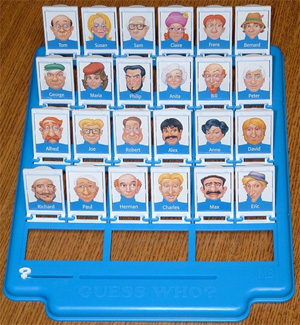
The concept I'm running with for now is a mashup of the classic games Frogger and Guess Who. While these games don't really have anything in common, I've taken some key components from each game to mix together into one awesome and challenging game, working title "Hop to Who?!"


Frogger elements:

  • The game objective of getting the frog safely across the road.
  • Timing the moves to avoid getting hit by moving objects such as traffic.
  • The frog character and the level design.


Guess Who elements:
  • Eliminating all the characters displayed so only 1 remains, by the help of descriptive clues.
  • Physical interaction of flipping down tiles.


The Story of 
"Hop to Who?!":

The Frog is a lonely amphibian looking for love. He'll go to any length to find "The One" so he's risking it all by traversing across the dangerous highway all for a blind date. It's your mission to get him to his correct date safely. Make an ill-timed move and it's all over for him. Choose the wrong character and he'll leave broken hearted. 


How to play:
  • The on-screen interface will display a frogger like level, there also will be a physical Guess Who style board with 16 character tiles shown face up.
  • There are 2 objectives, both equally important. Get the frog across the road to safety and eliminate all but one of the characters correctly.
  • To move forward the player has to flip down a character's tile
  • The computer will show clues about what the mystery character looks like, so the player can flip down irrelevant tiles.
  • The challenge is to flip the tiles down in sync with moving the frog to avoid collisions. This requires 2 mental processes to happen at once, strategic elimination and quick response.
  • If the player gets the frog to safety, then there is the added reveal to check if they have selected the right character. Hopefully Frog can live happily ever after!


To Do Next:
Start planning the video prototype, writing the script, storyboard so I can shoot and edit this weekend. I also need to write the Statement of Delivery and a Testing/Evaluation plan. The next blog will be about the video prototyping process.


Week 3: Video Critiques

During this week's lecture we watched a few more examples of video prototypes, all with varying degrees of good and not so good points. Watching and discussing these videos definitely helped to break down what works and what is less successful in a video, and hopefully I can take away the good examples and apply this to my own video.


Brisbane Park Finder


First impression
Definitely not a compelling video, the communication of the concept wasn't clear, and the production quality fairly poor.

Can you understand the concept?
By the end of the video I did understand the concept, however I don't think it was completely clear from the beginning.

What questions does it raise?
They never really addressed what the problem was, and how their product solved anything and if there is a need for this product. They didn't show the product in use much at all, so I was left wondering if they successfully built the features they described.

What could they do better?
Show the product more and scenarios of it being used. There was a super quick shot of it being used, but the rest of the video only showed the guy describing how it worked, not showing it in use. Improving the audio, there was a bit of background noise.

What do they do well?
What they showed of the Park Finder looked good.

Is there a better way to show certain things?
Showing the demonstration of the Park Finder would have been better if the audio description matched the voice over. He mentioned an example of searching in Greenslopes, however the demo showed a different suburb, which I found distracting, and therefore detracted from what he was trying to communicate.

Quality of the video/audio
The video quality seemed fine. The audio had a lot of obvious background noise.


Google Docs in Plain English


First impression
Overall I found this quite easy to follow and rated it as an example of a good video.

Can you understand the concept?
Yes it was communicated very clearly. It uses appropriate language, and uses metaphors to help the audience understand more abstract concepts, e.g Docs is a "home" for our documents. The visuals supplement the description well and further illustrate their message.

What questions does it raise?
I think it's pretty well explained.

What could they do better?
Some of the production quality was quite lo-fi, but this may have been their intention. The voiceover and pacing was a little too fast and possibly could have been slowed down a bit to help viewers take the information in.

What do they do well?
They defined a problem at the beginning the of video and told the story of a user scenario which illustrated their solution.

Is there a better way to show certain things?
They didn't show the use of an actual Google document directly, with only explaining the features of Google Docs.

Quality of the video/audioIt was well produced, and the audio was clear.


Pegasus Game


First impressionConfusion about what this game is actually about

Can you understand the concept? No at all - only that it is some kind of board game - possibly?

What questions does it raise? 
What is this game about? What are the rules? Why should I play this?

What could they do better? 
Give some explanation about what the game is about, why it should be played, how is it played. The soundtrack wasn't really appropriate, especially considering it was the only audio track it felt unnecessary and distracting.

What do they do well? The footage of the game play looks of a high quality.

Is there a better way to show certain things? The gameplay needed description, showing various moves made in the game means nothing to the audience if they don't know the objectives of the game. This could be a voiceover, or text descriptions throughout.

Quality of the video/audio 
Production wise the quality was fine.


Gauss Glasses


First impression
Pretty good overall, perhaps too long in describing the science behind it.

Can you understand the concept? 
Yes, it was explained well, the problem and solution was clearly defined.

What questions does it raise?
I wasn't sure how these glasses rate against regular glasses. Also I was wondering how accurate the dangers of the blue light is, and how these glasses rate in protecting against it (maybe that's my inner sceptic thinking). Although the way they explained the problem of blue light did make me feel concerned, albeit quite alarmed when they showed the light burning the back of the eyes.

What could they do better?
Some of the animation, such as the moving graph of the light radiation I didn't understand, it looked very scientific, but I didn't know what the significance of the data was, so this could have been illustrates better. Also including some feedback from professionals like optometrists to help give quality assurance and professional back up to their claims.

What do they do well?
They definitely sold their product and it's benefits well, and compelled me to consider buying the glasses. They showed great video of the people behind the manufacture, so that assured me that they were going to be made well.

Is there a better way to show certain things? 
Some of the animation could have been done in a more refined manner (for example the burning eye animation) and the graphs could have been shown in a more approachable way.

Quality of the video/audio 
It was really well done and professionally produced.


Overall takeaways:
  • A good video should introduce the problem space at the start, and subsequently offer a solution to this problem. 
  • Relate the solution back to the audience, tell them why this product benefits them. 
  • Communicate clearly, so that the whole audience can understand (i.e. don't use technical jargon if your audience are laymen) 
  • Use scenarios to show the context of use and explain how the product works 
  • Visuals should support the audio descriptions. 
  • Inferior production quality can detract from the video's message and professionalism.